🛠️ Improvements
🔍 Super Search - Batch Actions: The Super Search “More Actions” menu is being updated to be named “All Actions” and includes all possible batch actions and a search bar to search for a specific batch action from the list. 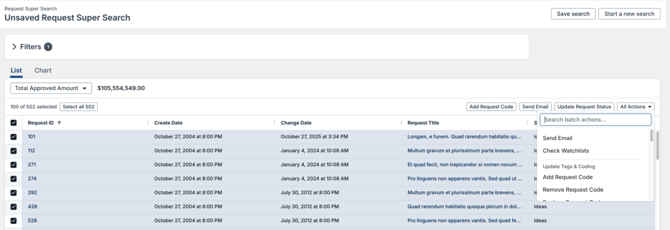
🔍 Super Search - Search Results: The Search results list box has been expanded to allow for more records to fit into the view. The page footer has been reduced to allow more space for the Search results box. 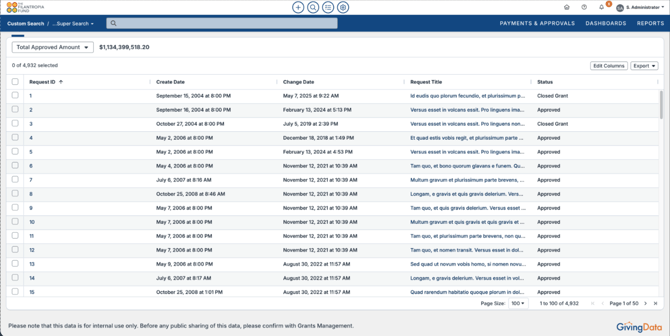
🏦 Grantee Portal – Bank Accounts: Portal Users with access to Organization Bank Accounts will be able to view the last 4 digits of the bank account number and the status of the bank account in GivingData. If a bank account cannot be edited, the pencil icon is replaced with a tooltip that informs the user why the bank account cannot be edited. When editing a bank account from the portal, users can now mark a bank account as Active or Inactive. Changes made to bank accounts in the Grantee Portal or within GivingData will be logged in the Activity Stream with the bank account properties that were edited. 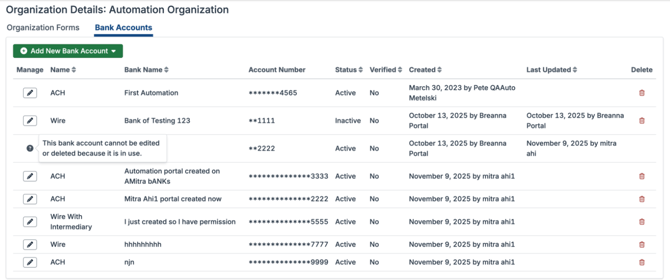
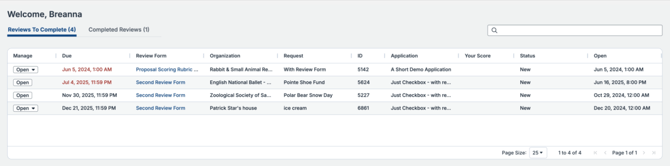
👥 Reviewer Portal – Home Page: The home page of the Reviewer Portal has been updated to have the reviews to complete in a list view with data separated into columns for sorting. The list also includes a search bar to quickly search for a specific review to complete.
💬 Comments: The design for comments throughout GivingData and the Grantee Portal has been refreshed to be more modern and user friendly. 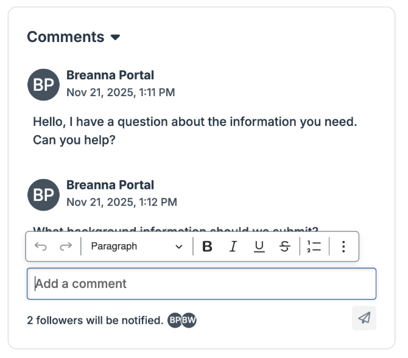
🐛 Notable Bug Fixes
Each release includes bug fixes to enhance stability and improve your experience. Here are some key fixes:
- Intake Forms: When editing a conditionally displayed field to be based on request coding, the coding hierarchy was not displayed when the user made the selection for the code. This has been resolved, and the coding hierarchy will now display as expected.
- Document Template Merge Fields – MEL: Merge fields in Word Document Templates for Request Assessments were pulling in active and inactive responses. This has been resolved, and only active responses will be merged into the Document Template through the merge field.
- Document Template Merge Fields – Documents created from tasks: When a document was created from a workflow task, the merge fields were not populated. This has been resolved.
- Super Search Sorting: When running a Task Super Search, an error prevented sorting the list upon columns that included Payment Custom Fields. This has been resolved.
- Scenario Planning: When editing the additional fields that display for a Request in Scenario Planning, the name changes did not take effect in the Request modal. This has been resolved.
- Codes: When selecting codes, if the code has a Name and a Short Name, the Short Name should display. Instead, the code Name was displaying. This has been resolved and the code Short Name will display if there is a value input.
- Codes: When assigning codes that have split percentages, percentages that included a decimal point were not able to save successfully. This has been resolved.
- Admin Settings – Declination Reason: There was a typo in the button to add a new declination reason. This has been resolved.
💡 If you encounter any issues, reach out to support@givingdata.com—we're happy to help!
📀Replica Database Schema Changes
Clients without a replica database in their subscription can disregard these technical details. This section is intended to notify administrators about changes to the database schema. If your subscription includes a replica database, these details may be relevant to the administrators managing your replica database or advanced data visualization tools like Power BI. For further assistance, please contact our support team.
No Changes.