
What’s New?
️ 🔍Super Search Default Settings: Criteria, Columns, and Column Sorting
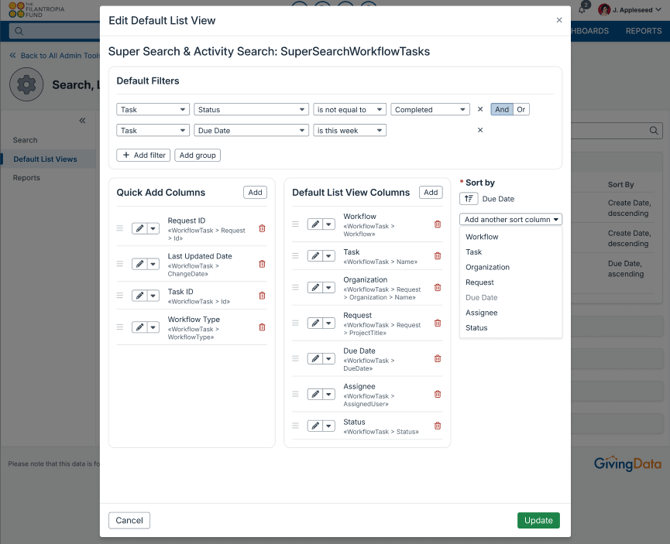
New Default List Views can be configured in the Admin Settings for Super Searches. Search filters, columns, and column sort order can be defined for each Super Search type. The default filters, columns, and column sort order will then be configured for new Super Searches that are run. Preconfiguring these settings will save you time when running a Super Search as your default preferences or settings will already be configured for each search. Search results can also be sorted by multiple columns, use Shift + click to sort by multiple columns.
💡Get richer views of data by sorting Super Search results by multiple columns. Save time adjusting filters by setting up defaults.
📚Learn More: Edit Default List Views & Super Search
🛠️ Improvements
🔍Super Search Results List Inline Editing—More fields are now editable!
From your Super Search results list, more fields can now be edited inline.
Request: Grant Fiscal Year, Publishing Notes, 990 Description, Website Title, Ready for Web, Regranting Enabled
Organization: Type, Tax ID, Compliance Notes, Vendor ID
Payment: Nondeductible Amount, Alert Text
Task: Status, Private
Portfolio: Budget, Inactive
Contact: Prefix, First Name, Middle Name, Last Name, Suffix, Salutation, Pronouns, Department, Title, Inactive
Document: Title, Notes
Super Doc: Title, Locked, Notes
Organization Alerts and Request Alerts: Notes
Interaction (general interactions only): Interaction Start Time, Interaction End Time
Organization Role and Request Role: Notes, Conflict of Interest
Watchlist Check: Notes
📚 A full list of fields that can be inline edited from Super Search can be found here!
🖋️Portfolio Dashboard – Inline editing of fields!
On the Portfolios Dashboard, fields can now be edited inline! The fields for Start Date, End Date, Budget, and Inactive status can now all be edited directly from the list.
👩User Profile Default List View Record Count – Now up to 250 rows!
A new default list view record count size of 250 rows is available in the user profile personalization settings.
🔍Super Search Columns – Your changes stay, even after you leave the page!
Changes to column order, width, and sorting will now be retained after navigating away from search results. These changes will also be retained when rerunning a recent search from the Recently Run lists on the Super Search landing page or the homepage. The default column order, width, and sorting will apply when running a saved search from the list of Saved Searches.
📆Grants Commitment Schedule Report
An update to the Grants Commitment Schedule Report now has the “As Of Date” look for data as of 11:59 PM on the user’s selected date. Previously, the “As Of Date” was looking for data as of 12:00 AM on the user’s selected date. This improvement makes end of year payment reconciliation easier.
🏦Bank Accounts – Updated Look to the list of Bank Accounts
The Bank Accounts page on the Organization record has an updated user interface to maintain consistency and improve accessibility. These changes do not contain changes in functionality but are visual improvements to the user interface. Changes to the UI include a new list view and updated buttons.
👤Add Contact Modal – Updated Look and New Optional Fields
The Add Contact modal has an updated user interface to maintain consistency and improve accessibility. The Add Contact modal now has a few additional fields that can be input when creating a new contact: Prefix, Middle Name, Suffix, and Salutation.
🔵Tags and Coding Page – Updated Look and Feel
The Tags & Coding page on the Organization and Request records has an updated user interface to maintain consistency and improve accessibility. These changes do not contain changes in functionality but are visual improvements to the user interface.
🔵 Subsidiaries Page – Updated Look and Feel
The Subsidiaries page on the Organization record has an updated user interface to maintain consistency and improve accessibility. These changes do not contain changes in functionality but are visual improvements to the user interface.
💲Add Payment Modal – Updated Look and Feel
The Add Payment Modal on the Request record Payments page has an updated user interface to maintain consistency and improve accessibility. These changes do not contain changes in functionality but are visual improvements to the user interface.
✅Task Completed Actions Modal – Updated Look and Feel
The Task Completed Action Modal for Workflow tasks has an updated user interface to maintain consistency and improve accessibility. These changes do not contain changes in functionality but are visual improvements to the user interface.
🐛 Notable Bug Fixes
Each release includes bug fixes to enhance stability and improve your experience. Here are some key fixes:
- Workflow Tasks: When accessing the workflow task from a link within an email notification, the task completion action that should trigger another workflow to be added did not add the workflow. This has been resolved.
- Super Search Export Date Format: The column formatting for date fields in Super Search did not retain when exporting the results list. This has been resolved.
- AI Summary: An issue where the AI summary was not reading text display fields as part of the analysis has been resolved. This has been resolved.
- Adobe Sign Integration: When sending a document out for signature through Adobe Sign, users were unable to add spaces within the message to recipients field. This has been resolved.
- Comments: Comments that were drafted, but not saved, were lost when a user clicked outside of the comment input box. Comment drafts are no longer discarded when clicking out of the comment box.
- Request Reference Numbers: For users with the Request Reference Number enabled to generate a number when a request is created, the number was not generating properly upon request creation. This has been resolved.
- Go Subscription – Emails: Email Templates are not available to Go subscribers; however, the option to select an email template was appearing to users when sending an email from GivingData. This has been resolved.
- Super Search – Organization Roles & Request Roles: When sorting the results list by a code column, the search displayed an error. This has been resolved.
- Grantee Portal – Codes: Codes that were made inactive in GivingData were still visible within the Grantee Portal codes. Deselected codes or inactive codes or their children will not display to the applicant, unless previously selected as an answer.
💡 If you encounter any issues, reach out to our support@givingdata.com—we're happy to help!
📀Replica Database Schema Changes
Clients without a replica database in their subscription can disregard these technical details. This section is intended to notify administrators about changes to the database schema. If your subscription includes a replica database, these details may be relevant to the administrators managing your replica database or advanced data visualization tools like Power BI. For further assistance, please contact our support team.
None.
🚨Known Issue - UPDATE: Resolved as of Dec. 17th with release of Hotfix 5.2.16.1
Super Search inline editing of fields from the results list has been temporarily disabled for date fields to prevent a known error from occurring. Editing of these fields will be restored in a Hotfix release that will be announced the week of December 15th. Fields that will be editable after the upcoming Hotfix release:
Request Searches: Proposal Due Date, Meeting Date, Application Receipt Date
Payment Searches: Schedule date, Original Schedule Date, Invoice Date, Check Cleared Date
Requirement Searches: Received Date, Scheduled Date
Interaction Searches: Interaction Date
Task Searches: Due Date
Portfolio Searches: Start Date, End Date
Organization Role and Request Role Searches: Start Date, End Date