
What’s New?
️  Contact Super Search Batch Actions
Contact Super Searches will now allow batch actions for your results list! Batch actions for Contact records include: Sending an email, checking watchlists, updating Contact coding, updating Contact tags, and adding an interaction.
Two user role permissions have been created to control user access to batch editing contacts and managing contact tags. Enable these permissions for your team to improve efficiency when managing contacts in bulk.
💡Make updates to Contacts in bulk to save time!
📚 Learn more: Batch Edit from a Super Search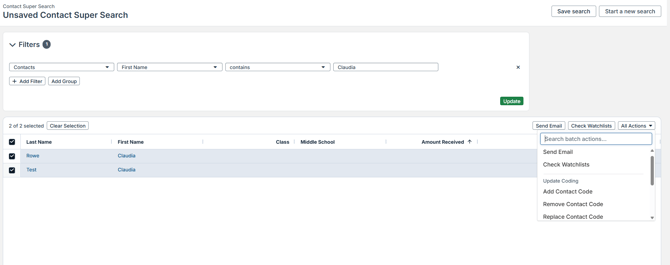
🛠️ Improvements
 CRM API – Retrieve more fields and add filters!
Additional fields are available through the CRM APIs to pull relevant Contact and Organization data, contact custom fields and contact codes. New filter parameters have been added to filter by contact create date, changed date or inactive status.
Please see our CRM API Documentation for more details: https://gdcentral.givingdata.com/crm-apis-v2-hn3lqq9h
 User Profile Page – Updated Look and Feel!
The User Profile page has an updated user interface to maintain consistency and improve accessibility. The “Personalization” page has been removed, and all options that were on this page are now located on the “Account” page.
 Organization Record Request Page – Updated Look and Feel!
The Request page found on the Organization Record has an updated user interface to maintain consistency and improve accessibility. These changes do not contain changes in functionality but are visual improvements to the user interface.
 Organization Record Payments Page – Updated Look and Feel!
The Payments page found on the Organization Record has an updated user interface to maintain consistency and improve accessibility. These changes do not contain changes in functionality but are visual improvements to the user interface.
🐛 Notable Bug Fixes
Each release includes bug fixes to enhance stability and improve your experience. Here are some key fixes:
- Default List Views: Changes made to the sort order for any list view in the Default List View settings were not reflected in the list view. This has been resolved, and changes made to default list view sort order after the release of 5.3.0 will automatically be reflected in the list view. Important: If a list view sort order was edited prior to Jan. 3, 2026 and the sort order is not displaying correctly in the list, the default list view sort order will need to be edited once more and re-saved to resolve the issue.
- Payments & Approvals Dashboards: Users received an error message when loading an approvals dashboard that had a negative total value for a status. This has been resolved.
- Removal of Campaign dates and Role dates: Users were unable to remove a date once it had been selected for date fields on the campaign settings and a contact’s role start and end dates. This has been resolved.
- Importing Documents from Grantee Portal forms: The field settings for file uploads within Grantee Portal forms has been updated to ensure the document title field is optional, not required.
- Error when Viewing Report: Users who had the user permission to view intake entries received an error when clicking on a submitted intake form to view it, preventing them from viewing the form. This has been resolved.
- Watchlist Checks: The watchlist check results had an incorrect published date listed for contacts. This has been resolved and now displays the correct published date if a match is found.
💡 If you encounter any issues, reach out to our support@givingdata.com—we're happy to help!
📀 Replica Database Schema Changes
Clients without a replica database in their subscription can disregard these technical details. This section is intended to notify administrators about changes to the database schema. If your subscription includes a replica database, these details may be relevant to the administrators managing your replica database or advanced data visualization tools like Power BI. For further assistance, please contact our support team.
- Users
- Columns:
- HubSpotID (nvarchar)
- HubSpotChangeDate (datetime)
- Columns:
- Organizations
- Columns:
- HubSpotID (nvarchar)
- HubSpotChangeDate (datetime)
- Columns: